Welcome to step two! This is all about the funding details.
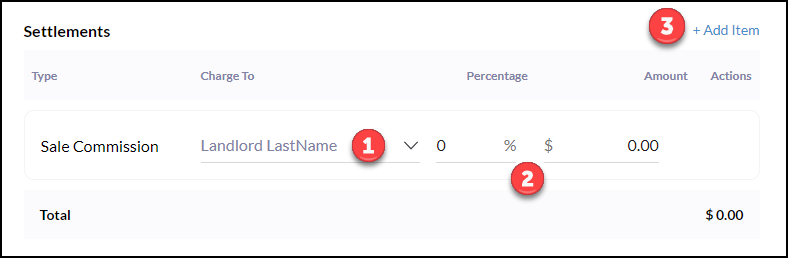
Settlements
1. Sale Commission will always default to the seller, however, this can be changed by clicking the dropdown in the 'Change To' field.
2. Input the percentage or dollar amount for the commission.
3. If additional funds are coming in that need to be included in the funding request click ‘Add Item’
Clicking Add Item will bring up a dropdown to select Sales Commission, Bonus,
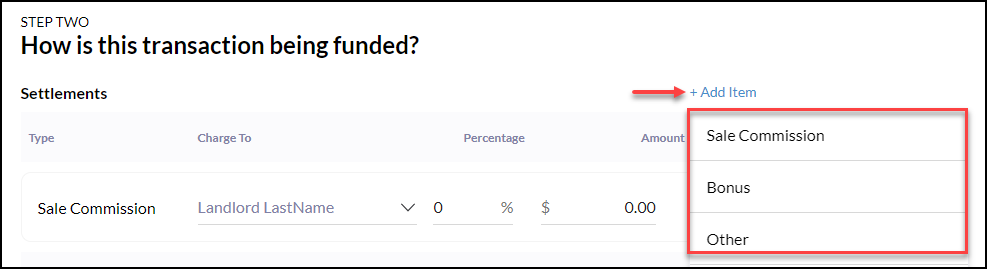
Example of a 'Bonus' Item: Funds on top of commission - For example, a builder offering a $100 bonus to agent if their buyer goes under contract and closes by end of the month. In this case, put in as a bonus, not part of the commission - on top of commission.
- It is important to enter as a bonus because these funds are exempt from any company split. In other words, 100% of the bonus goes to you!
Example to use 'Other' option: Used for any instance not applicable to other options. For example, an agent has a listing and paid for landscaping to prepare to list the property. If an agreement has been made for your client to reimburse you at closing, use this option. In this example, the amount would be charged to the seller and rename the line for what the reimbursement is for - "Landscaping Reimbursement"
Example of Payment from Agent: Used when an agent is contributing funding outside of commission. For example - If the transaction fee is not being pulled from the commission because the agent has decided to waive the commission, the agent is still responsible for the transaction fee. This will be paid by the agent using this line item.
Payouts
Payout is where the incoming funds are going to be dispersed. 4 line items are automatically generated.
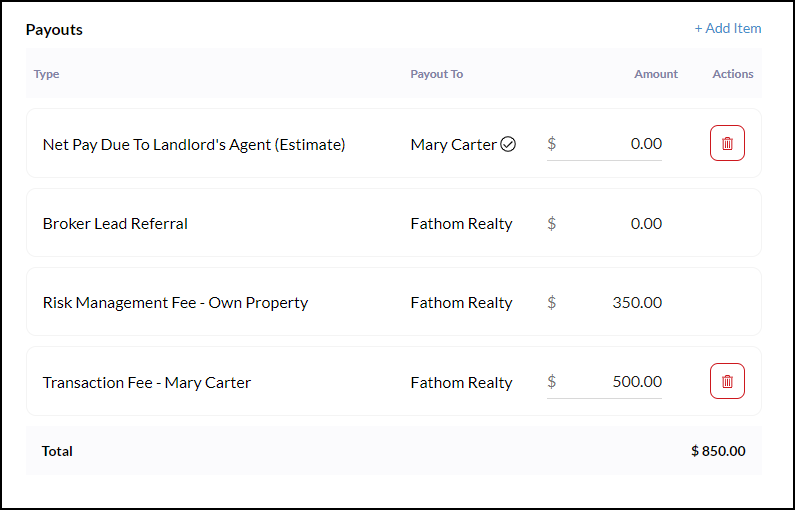
+Add Items:
FAST Mentor: If a mentee is in the FAST mentor program - the mentor line item will appear and the dollar amount/percentage due is already calculated. If you have completed the FAST program and are still seeing this display while completing your funding request, please reach out to Fathom Agent Services.
Team Member: Team leader line item will automatically appear, however, you must manually input the dollar amount or percentage due. You will need to go in and put in the amount based on your team agreement.
Internal/External Referral: There is a question in the transaction details that asks about referral fees to another agent and should be answered appropriately. If an external referral - agent outside of Fathom is getting paid - need w9 for brokerage and upload as a document in the transaction.
Contribution to buyer/seller: A contribution to whichever party at closing. For example, if you have agreed to pay for your client's home warranty at closing. If you are rebating part of your commission back to the client, that is considered a contribution.
- It is important to use the contribution item option because when the CDA is generated a contribution letter will also be generated and sent to the settlement agent. This letter authorizes the settlement agent to disburse that contribution where it needs to go. The settlement agent is unable to disburse those funds without the contribution letter.
Additional brokerage split/fee: Any additional brokerage split/fee that is not automatically included. For example, if in your local market the MLS charges listing fees.
Other: Anything else that does not fall into these other categories. If unsure, contact Fathom Agent Services.
Agent Remarks
Agent Remarks are used for any questions or concerns you have about your funding request. This is reviewed by accounting and updated accordingly based upon these remarks.
Example 1: if you have been charged a $450 transaction fee but you know you’ve already hit your CAP and your transaction fee should only be $99. In the Agent Remarks put “Hit CAP, Transaction Fee should be $99” - these remarks will be reviewed as your funding request is reviewed.
Example 2: If you have an alternate payment method on file and would like to receive payment via direct deposit or wire transfer, please mention it in Agent Remarks.