It is important to evaluate email activity metrics to view the performance of your email broadcasts. Below is a breakdown to help you understand these metrics.
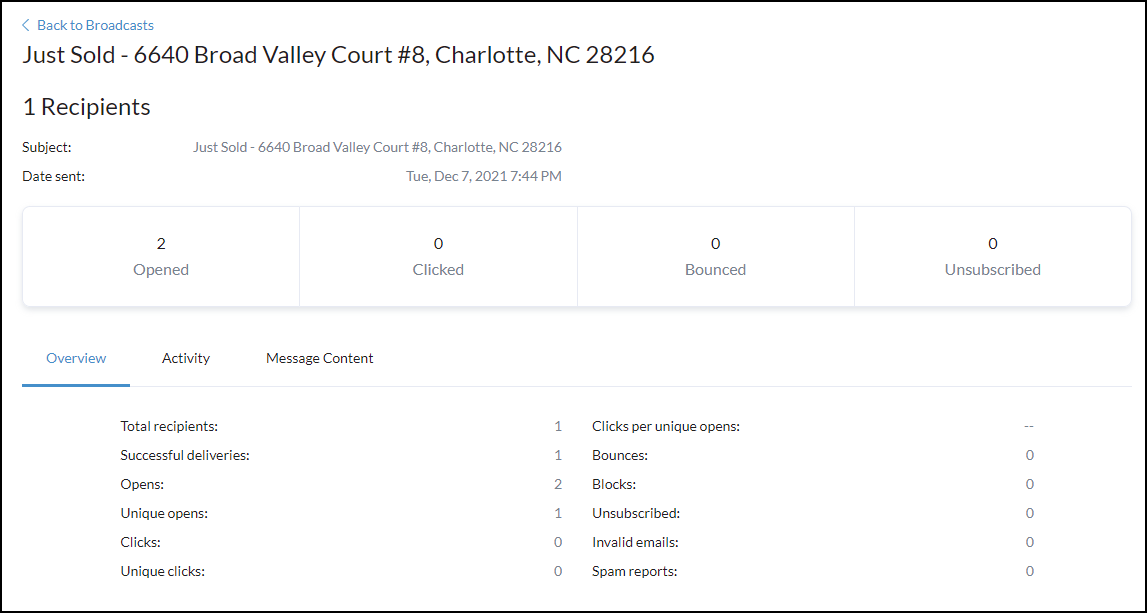
Activity Overview
| Total Recipients: | Displays how many contacts the broadcast was sent to. To see the breakdown of the contacts and each of their individual email activity you can click on the 'Activity' tab. |
| Successful Deliveries: | The receiving email server accepted the message. |
| Opens: | The recipient opened the email. |
| Unique Opens: | The number of unique recipients that opened the email regardless of how many times each recipient may have opened the email. |
| Clicks: | The “Clicks” statistic represents the total number of times your contacts have clicked on the various links within your emails |
| Unique Clicks: | “Unique clicks” defines the number of unique individuals that have clicked the links in your emails. |
| Clicks per unique opens: | defines who has opened your email and clicked on the link inside at least once. |
| Bounces: | Bounces occur when the receiving server returns a code that indicates that the reason for the refusal is a permanent issue with that server or recipient address. The most common reason an email address will bounce is due to the address in question is not valid. |
| Blocks: | The receiving server denied the message. |
| Unsubscribed: | The recipient unsubscribed from your email(s) |
| Invalid emails: | the attempt to email was sent to an address that is not formatted to meet standard email formatting or does not exist in the mail server |
| Spam reports: | Spam reports happen when a recipient indicates that they think your email is spam and then their email provider reports it as such. |