To begin, log into your domain account to manage the DNS Settings with your domain registrar. This is the website where you originally registered your domain and you will need to make adjustments. **Note that every domain registrar may handle this differently.
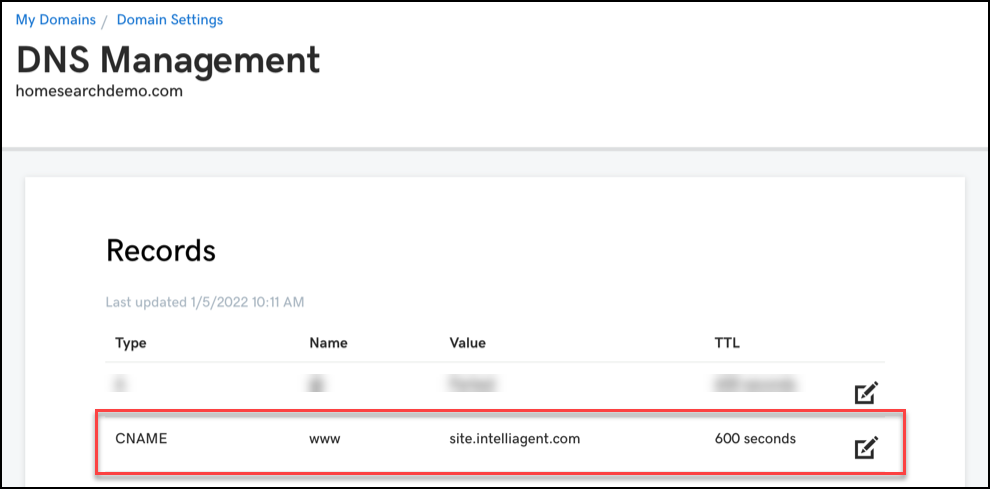
In general, from your domain registrar, go to your DNS Settings and locate the CNAME to point your vanity domain.
Your CNAME must be updated to point to site.intelliagent.com and not your vanity domain name.
Update the TTL (Time To Live) for how quick you want your domain name update to go live. i.e. 60 sec, 300 sec, 600 sec. Please note, that each domain registrar may have limitations on what TTL time you can select.
Please see the screenshot below as a reference for managing the CNAME and TTL.
- It may take 24-48 hours for DNS changes to update throughout the Internet.
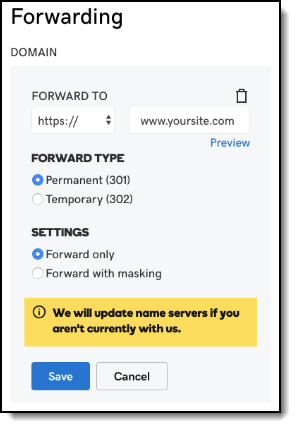
Forwarding (optional) - In instances where a consumer does not type www we need to make one more update to the domain forwarding.
Go to the Forwarding section of your domain and ensure the following settings are in place.
1. Select under 'Forward To' select https//
2. Enter your domain name with the www. For example, www.yoursite.com
Need help with DNS Settings?
Please reach out to your Domain Registrar who is best able to assist you with these settings.
Below are some support links for some commonly used domain providers and their steps.